How to Build a Multi-Vital Screening Station: Component Guide
A technical analysis of the multi vital screening station component guide, covering cameras, blood pressure modules, scales, thermals, edge compute, workflow design, and deployment tradeoffs.
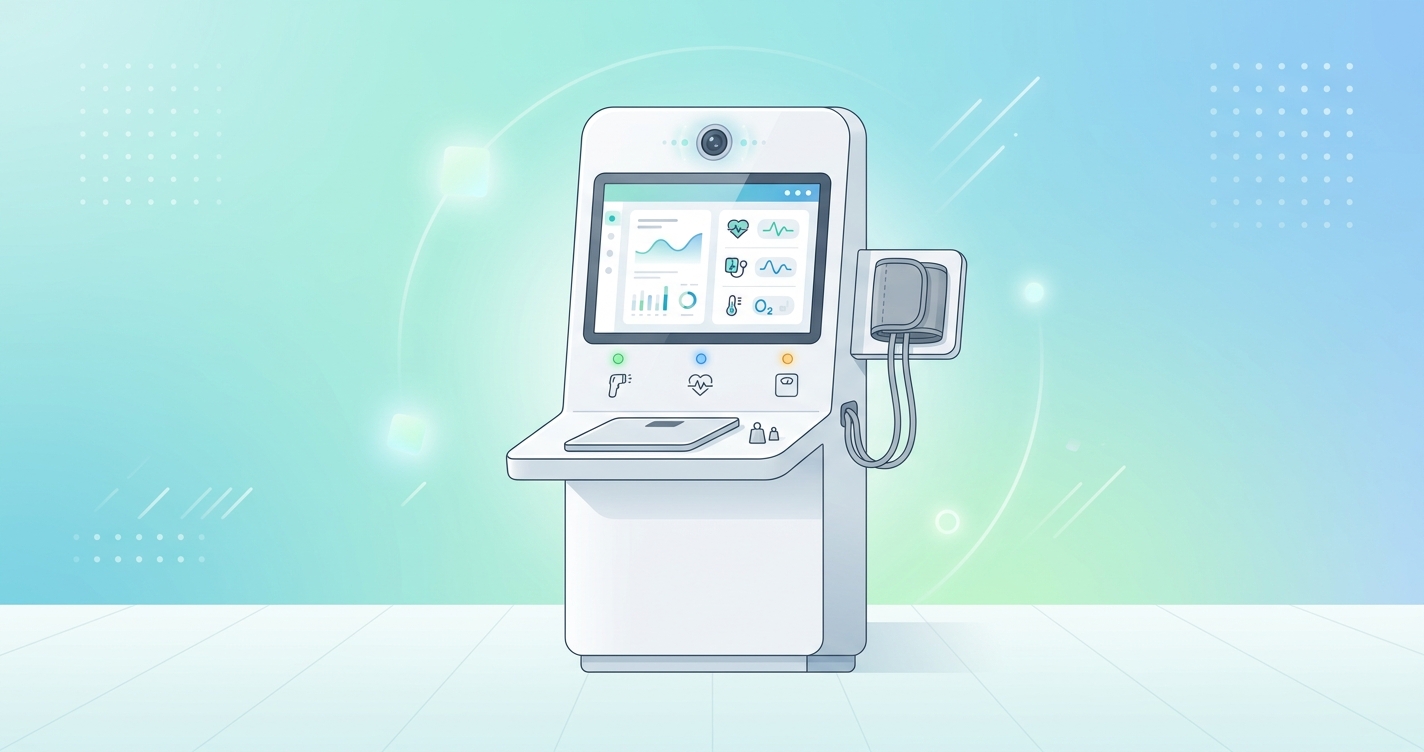
A multi vital screening station sounds simple until the hardware team has to make one work in the real world. The concept is straightforward enough: combine blood pressure, temperature, weight, pulse-related signals, identity, and a usable interface into one station that can run in clinics, pharmacies, lobbies, or employer sites. The hard part is that each subsystem behaves on its own schedule. Cameras want stable light. Blood pressure modules want proper cuff sizing and seating. Scales hate uneven flooring. Enclosures trap heat. Network links fail at exactly the wrong time. A useful multi vital screening station component guide has to deal with those boring constraints, because boring constraints are what usually decide whether a screening station becomes a dependable workflow tool or an abandoned kiosk in the corner.
"Blood pressure was the most frequently measured vital sign, utilized in 34% of the reviewed studies." — Saksham Bhutani, Aymen Alian, Richard Ribon Fletcher, Hagen Bomberg, Urs Eichenberger, Carlo Menon, and Mohamed Elgendi, Communications Medicine, 2025
Multi vital screening station component guide: what the system actually includes
The 2025 systematic review by Bhutani and colleagues looked at health kiosk research published from 2013 to 2023 and found that cardiovascular screening was the main motivation in 56% of the included studies. That tracks with what device teams keep building: stations that combine a few high-frequency screening tasks rather than trying to replace an exam room.
In practice, most multi-vital stations break into six component groups:
- user interface and identity layer
- core vital sign sensors
- contactless camera and lighting subsystem
- edge compute and storage
- enclosure, power, and thermal controls
- connectivity and workflow integration
The mix changes by environment. A pharmacy station may prioritize speed and easy resets between users. A clinical intake station may care more about audit trails, EHR handoff, and repeatability. A workplace or public-access station has a different problem again: it needs to tolerate misuse without turning into a support ticket generator.
| Component layer | What it does | Why it matters in a screening station |
|---|---|---|
| Touch display and UI | Guides the user through the session | Good UI reduces staff intervention and capture errors |
| Identity and intake | Confirms user, collects symptoms or demographics | Makes measurements usable inside a workflow |
| Core sensors | Measures BP, temperature, weight, SpO2, or related metrics | Determines which screening use cases the station can support |
| RGB camera and lighting | Supports face guidance and contactless pulse-related capture | Signal quality depends heavily on light and alignment |
| Edge compute | Runs capture logic, estimation, and local rules | Keeps the station responsive even when WAN links wobble |
| Enclosure, power, and networking | Keeps everything running safely for long duty cycles | Reliability problems usually start here, not in the algorithm deck |
The sensor stack should start with workflow, not feature count
This is where teams get tempted to overbuild. More modules look impressive in a product spec, but each added sensor introduces calibration, maintenance, cleaning, and user-guidance problems. Bhutani's review is useful here because it shows which measurements appear most often in deployed kiosks. Blood pressure dominates the literature. Weight, temperature, pulse, and oxygen saturation also show up frequently because they map cleanly to triage and chronic disease screening.
That does not mean every station should carry every modality.
A lean clinic intake station often centers on:
- automated blood pressure
- weight and BMI inputs
- temperature
- optional pulse oximetry
- camera-based face guidance or pulse-related capture in controlled settings
A more ambitious station might add height, ECG peripherals, or document capture, but complexity rises fast once the user has to reposition, attach, or disinfect multiple peripherals in one session.
The blood pressure module deserves more respect than it usually gets in kiosk planning. Research on unattended blood pressure workflows shows why. In a family medicine implementation study, Chia-Fang Chung, Sean A. Munson, Matthew J. Thompson, Laura-Mae Baldwin, Jeffrey Kaplan, Randall Cline, and Beverly B. Green reported that most patients were comfortable using self-service blood pressure kiosks, but provider trust depended on comparing kiosk readings with other validated monitors and reviewing the evidence. That is a reminder that hardware selection is only half the job. Trust comes from measurement discipline, cuff fit, seating posture, and workflow rules around repeat readings.
Cameras and lighting are not optional details
If a station includes camera-based pulse or respiratory capture, the optical stack needs to be treated as a first-class subsystem. J. Lee, S. Kim, and J. Kim wrote in their 2021 review of contactless vital signs monitoring that remote measurements remain highly sensitive to lighting, motion, and camera quality. That sounds obvious, but plenty of kiosk designs still treat the RGB camera like a commodity webcam bolted onto a metal frame.
That usually ends badly.
A 2018 paper by Aminuddin Rizal, Yu-Chen Lin, and Yuan-Hsiang Lin proposed a self-service healthcare kiosk using remote imaging photoplethysmography to estimate pulse rate, respiratory rate, and systolic blood pressure. The interesting takeaway is not just that the method worked. It is that the kiosk had to be designed around controlled capture conditions. Contactless measurement only earns its keep when the station can hold the face in a usable zone for long enough to get a clean signal.
The lighting evidence points the same way. A 2021 study on remote photoplethysmography measurement conditions reported the smallest mean R-R interval error when frontal illumination exceeded 500 lux. That finding matters because it turns vague design advice into a hardware requirement. If the station depends on camera-based vital capture, it needs controlled frontal illumination, face-position guidance, and a mounting geometry that avoids harsh shadows.
| Optical design choice | Better option for most stations | Risk if ignored |
|---|---|---|
| Camera placement | Eye-level or slightly above with fixed face distance | Poor framing and inconsistent ROI capture |
| Lighting | Controlled frontal light around the capture zone | Motion artifacts, shadows, unstable pulse signals |
| Display prompts | Real-time alignment guidance | Users drift out of the valid capture window |
| Capture duration | Short but not rushed, usually several seconds | Too little signal for stable estimation |
| Background processing | On-device face tracking and quality checks | Cloud delays make the user experience feel broken |
Edge compute is what turns a station into a product
The station cannot feel slow. That seems trivial, but it is probably the easiest way to destroy user compliance. If the UI hangs between modules or waits on cloud services for every step, staff will stop trusting it and start bypassing it.
For that reason, the compute layer should usually handle the time-sensitive parts locally:
- camera acquisition
- face guidance and quality checks
- peripheral polling
- first-pass estimation
- session logging
- local retry and failover logic
This approach also lines up with current market direction. Grand View Research estimated the global medical kiosk market at about $1.242 billion in 2022 and projected roughly 14.8% compound annual growth through 2030. That kind of growth tends to reward systems that are easier to deploy at scale, and easier deployment usually means fewer fragile dependencies.
A screening station does not need datacenter-class hardware, but it does need margin. Underpowered processors create a familiar mess: UI lag, camera frame drops, thermal throttling, and peripheral timeouts that look like software bugs until somebody opens the enclosure and notices the heat.
Enclosure and thermal design quietly decide uptime
This is the least glamorous part of the build and one of the most important. Kiosk teams love talking about models and sensors. They spend less time on fan paths, cable strain, power conditioning, or how a cuff module gets serviced without disassembling half the cabinet. Then the station ships, runs all day in a warm lobby, and starts behaving strangely by week three.
A useful enclosure design needs to account for:
- seated and standing ergonomics
- service access to sensors and cabling
- ventilation around compute modules and power supplies
- acoustic noise if active cooling is used
- cleaning durability for touch surfaces and peripherals
- floor stability for weight measurement
- privacy shielding around the display and camera zone
That last point matters more than many teams expect. A multi-vital station is not just a measurement device. It is also a semi-public interaction surface. If a user feels exposed while entering data or aligning for a camera capture, completion rates drop.
Industry applications change the component mix
Clinical intake and waiting rooms
These stations need reliable throughput, repeatable measurement conditions, and clean handoff to local workflows. The best pattern is usually a sturdy enclosure, validated BP hardware, a stable scale, and enough compute to keep the camera and UI responsive. Posts like What Is a Health Screening Station? Waiting Room Deployments and Edge Computing for Real-Time Vitals: Hardware Requirements fit this same design logic.
Pharmacy and retail deployments
Retail stations need short sessions and simple maintenance. They should be easier to wipe down, harder to misalign, and forgiving when users rush through prompts. That is one reason pharmacy deployments often limit the number of active peripherals at a single station.
Employer and public-access sites
These stations care more about durability, remote monitoring, and graceful recovery after misuse. Field support costs can outrun hardware savings surprisingly fast, so serviceability matters.
Current research and evidence
The research base for multi-vital kiosks is still uneven, but a few themes repeat.
Bhutani, Alian, Fletcher, Bomberg, Eichenberger, Menon, and Elgendi concluded in 2025 that kiosk systems can ease pressure on healthcare settings and expand access, though they still face technical, regulatory, and financial hurdles. Lee, Kim, and Kim's 2021 review framed contactless vital monitoring as promising but highly dependent on motion control, lighting, and acquisition quality. Rizal, Lin, and Lin showed in 2018 that a self-service kiosk could use remote imaging photoplethysmography for multiple measurements, but only within carefully managed capture conditions. And the family-medicine kiosk work led by Beverly B. Green suggested self-service blood pressure can fit clinic workflows when the device is trusted, the process is understandable, and staff can verify results against established monitors.
| Study | Year | Practical takeaway for component planning |
|---|---|---|
| Rizal, Lin, and Lin | 2018 | Multi-parameter contactless capture depends on controlled kiosk geometry and guidance |
| Lee, Kim, and Kim | 2021 | Contactless vitals performance is tightly tied to lighting, motion, and camera quality |
| Remote PPG measurement conditions study | 2021 | Frontal lighting above 500 lux improves signal conditions for rPPG capture |
| Chung, Munson, Thompson, Baldwin, Kaplan, Cline, and Green | 2023 | Self-service BP kiosks work better when workflow trust and measurement discipline are built in |
| Bhutani et al. | 2025 | Blood pressure remains the most common kiosk vital, and deployment barriers are usually operational |
The future of multi-vital screening stations
The next generation of screening stations will probably be less sensor-heavy and more workflow-aware. I do not think the winning systems will be the ones with the longest feature list. They will be the ones that know when to keep the session moving, when to repeat a measurement, when to route the user to staff, and when to run locally because the network is having a bad day.
That is also where platforms like Circadify fit naturally. Instead of treating contactless capture as a science-project add-on, newer embedded approaches are folding camera-based vital assessment into broader screening-station architectures for kiosks, tablets, and clinical hardware. The hardware conversation is getting more realistic, which is a good thing. Buyers want stations that can survive deployment, not demo booths that behave for five minutes. For teams planning embedded screening devices, the next step is usually a practical integration review tied to the clinical kiosk workflow at Circadify's clinical kiosk solutions.
FAQ
What components are essential in a multi-vital screening station?
Most stations need a display, identity or intake workflow, a blood pressure module, weight measurement, temperature sensing, edge compute, and a durable enclosure. Camera and lighting components become essential if the station includes contactless pulse-related capture.
Why is blood pressure usually the anchor measurement?
Because it is one of the most commonly deployed kiosk measurements in the literature and maps well to triage, chronic disease screening, and routine intake workflows. It also has a mature ecosystem of validated hardware modules.
Can one station reliably combine contact and contactless measurements?
Yes, but only if the interaction is sequenced carefully. Contact modules like BP cuffs and scales need physical stability, while contactless camera capture needs controlled lighting and face alignment. Combining them is possible; combining them casually is where trouble starts.
Should multi-vital stations process data locally or in the cloud?
The session-critical steps usually belong at the edge. Local processing helps with responsiveness, device independence, and failover. Cloud systems still make sense for reporting, fleet management, and downstream analytics.